
terebi
A personal native macOS player whose playback code is small enough to own and modify. FFmpeg reads and decodes media; our C++ worker owns playback. SwiftUI owns the controls, Core Audio owns audio output, and Metal presents video.
Build and run
Requires macOS 15+, Xcode's command-line tools with Swift 6, and Homebrew FFmpeg/pkg-config:
brew install ffmpeg pkg-config
make
make run
The developer app is .build/terebi.app. It links the installed FFmpeg libraries; it is not a standalone distributable bundle. After upgrading FFmpeg, rebuild with make -B or reinstall with make -B install.
Open a local file with ⌘O, drop it onto the window, or use Finder's Open With. Successfully opened files start playback automatically, including when replacing the current file. ⇧⌘W closes the file; closing the window quits and joins the worker.
Release and installation
make release                         # optimized build in .build/release, without -g
make install                         # default PREFIX=$HOME/.local
make install PREFIX="/custom/path"   # optional installation prefix
export PATH="$HOME/.local/bin:$PATH"
terebi --help
Installation puts the CLI at ~/.local/lib/terebi/terebi and the app beside it at ~/.local/lib/terebi/terebi.app; ~/.local/bin/terebi is a symlink to the CLI. A custom PREFIX uses the same lib/terebi and bin layout. The default needs no sudo. Release artifacts are separate from developer builds, and reinstall replaces the installed app bundle without touching unrelated prefix contents. Close a running player and relaunch after installing an update.
FFmpeg is still external. Builds and installs—including cached release installs—check pkg-config and all five FFmpeg development packages before compiling or copying. Missing dependencies report brew install ffmpeg pkg-config.
At runtime, both the CLI and the app's lightweight bootstrap check the exact FFmpeg dylibs linked by the player, including their transitive dependencies. Missing, incompatible, or broken libraries report brew install ffmpeg and explain that library-version changes require rebuilding/reinstalling terebi. The CLI exits 69; Finder launches show a native error dialog instead of failing in dyld before the UI starts. Missing or invalid dependency metadata also reports rebuild/reinstall. CLI help remains available without FFmpeg.
The declared app executable stays running after preflight and loads Contents/Frameworks/libterebi-player.dylib in-process. It does not exec another executable: LaunchServices retains the real app PID and identity, so third-party Now Playing source lists such as Vorssaint can discover it. Missing/unloadable player libraries or an invalid entry point also show the native rebuild/reinstall error dialog.
Command line
make also builds .build/terebi, a native CLI launcher:
.build/terebi "/path/to/video.mp4"
.build/terebi 'https://youtu.be/jNQXAC9IVRw'
.build/terebi --url 'https://www.youtube.com/watch?v=jNQXAC9IVRw'
.build/terebi -- -video.mp4
.build/terebi --help
One local file (including a local file:// URL) or YouTube video URL is accepted. Paths are relative to the shell's current directory; quote spaces and URL query strings. -- treats the following argument as a filename. With no arguments, the CLI opens or activates the player without replacing its media. To use terebi by name, add the build directory to your shell's PATH: export PATH="$PWD/.build:$PATH".
The launcher finds terebi.app beside its own executable, following symlinks, and uses macOS application/URL delivery to reuse the running player and its existing window. Keep the executable and app bundle together; this is not a standalone distribution. Media opens use the same autoplay and saved-progress behavior as the UI. Relaunch an older running build once to load the new external-open handling.
Help exits with status 0 without opening the GUI or loading FFmpeg. Invalid arguments, unsupported URLs, missing files, and directories report to stderr and exit 64; unavailable FFmpeg libraries and application-launch failures exit 69. A successful launch exits 0 immediately after macOS accepts the request, not when playback finishes. Later extraction/decoding failures appear in the player window; this is a GUI launcher, not a headless player or remote playback-control interface.
YouTube
YouTube playback optionally requires yt-dlp, its EJS components, and a supported JavaScript runtime. Homebrew provides the extractor and its components; Deno is recommended:
brew install yt-dlp deno
Use ⇧⌘O → Open YouTube URL…, the playback-actions menu, or drop a YouTube video link onto the window. Watch, short-link, Shorts, live, and embed URLs identify one video; playlists and channels are not opened. Resolution is cancellable by closing or replacing the media. Finder launches also search the usual Homebrew executable locations.
yt-dlp defaults to the highest available SDR resolution at or below 1080p, falling down to a lower resolution when 1080p is unavailable, with the best available audio. FFmpeg plays the selected HTTP(S) streams or native HLS manifests directly, including separate video/audio inputs or a combined stream: no embedded browser, temporary full-video download, or muxing step. Playback, coordinated seeking, frame stepping, volume, and same-window compact mode use the existing native player. Buffering… freezes the playback clock without disabling pause, close, or replacement; live/non-seekable inputs disable seeking and frame stepping, and live sources show LIVE.
Network playback controls show Buffered: 1.6s ahead in both normal and compact mode, so short buffers remain visible even on a multi-hour timeline without opening a tooltip. Buffered: — means no estimate is available, including during seeks or for live/unknown-duration media. The normal-mode seek bar also highlights the buffered range in lighter gray ahead of the playhead, drawn to scale; hover for the buffered-through timestamp, which VoiceOver also includes. This is a conservative playable range constrained by both required audio and video inputs, including decoded/output buffers—not a percentage downloaded or a persistent cache of the whole video. It resets on seeks, quality/source changes, and close. Local playback displays neither indicator. On long videos the shaded segment can be sub-pixel because the retained buffers are bounded; the readout remains legible whenever the controls are visible.
While playing YouTube, choose gear → Quality in either normal or compact mode. The dropdown lists the video's supported SDR resolutions, including 1440p/4K when available, and shows the current resolution. Default (up to 1080p) restores the cap. Switching resolves fresh stream URLs and briefly pauses while reopening, preserving the position for seekable recorded videos, play/pause state, and the same window, size, and mode. An extraction failure leaves the previous stream selected and restores its playback state. Live/non-seekable streams reopen without position restoration. New video opens use the default again; manual quality choices are not persisted.
The app ignores yt-dlp configuration and plugins, does not read browser cookies, and does not update or fetch extractor components automatically. Private, age-restricted, region-blocked, or sign-in-required videos can fail. If YouTube extraction changes, run brew upgrade yt-dlp deno; local playback needs neither dependency.
Resume playback
Reopening a local video or YouTube video automatically resumes its saved position, including after quitting and relaunching the app. Local files use their resolved file paths; YouTube uses the canonical video webpage URL, so short links and newly extracted media URLs share progress. The app does not automatically reopen the last video on launch.
Progress is stored locally in UserDefaults, checkpointed every five seconds of playback progress, and saved on pause, close, replacement, and normal quit. Only authoritative, acknowledged positions are saved—not an unfinished seek or slider drag. Finished videos clear their bookmark and reopen from the beginning; a bookmark beyond the current video's duration also restarts at the beginning. Failed opens preserve existing bookmarks. Live/non-seekable inputs and audio-only media do not record progress.
Playback UI
The layout follows IINA's video-first window and the supplied screenshots: a 32-point frosted titlebar with native traffic lights and file icon, plus a dark frosted 440 × 68-point floating controller. AppKit materials blur the video beneath the chrome; muted icons, an orange volume track, a narrow seek thumb, and zero-padded time labels follow the reference. Shared vertical padding and an optical offset for symbol/slider insets balance the controller's visible top and bottom margins in both play and pause states. The controller starts centered with a four-percent bottom inset and keeps its relative position when the window changes size.
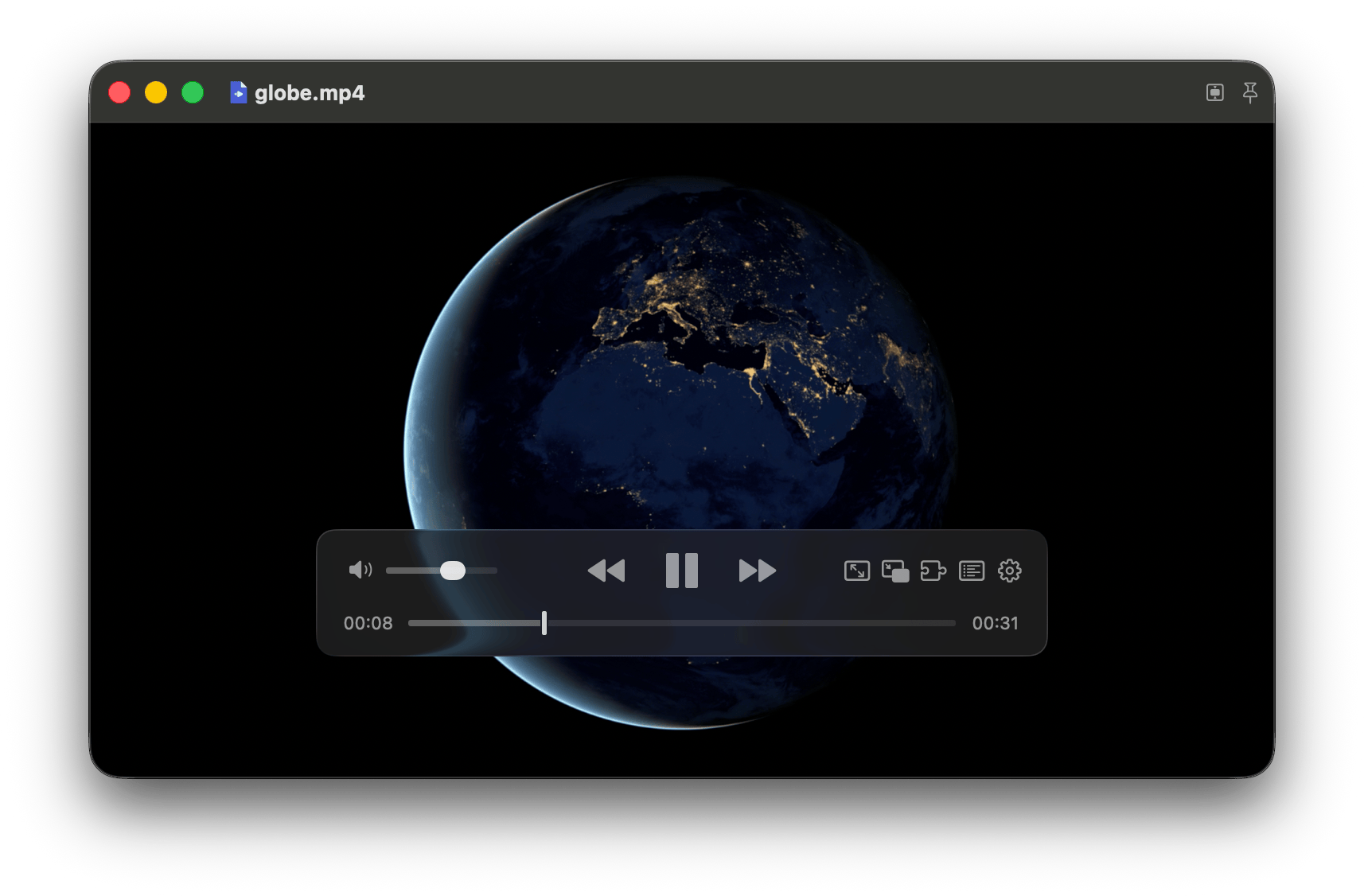
Opening video fits the window to its display aspect ratio, including non-square pixels, and constrains subsequent window resizing. Fullscreen retains the normal letterboxed renderer; audio-only playback and close release the aspect constraint. Extreme ratios that cannot fit both the screen and usable controls keep a freely resizable letterboxed window.
Compact mode uses the same window, Metal view, and playback session—not a second window or macOS system PiP. Use the PiP-shaped button in the normal playback controls, ⌃⌘P, or Playback Actions → Enter Compact Mode. The compact-mode button replaces the fullscreen button; fullscreen remains available through its menu, keyboard shortcuts, and double-clicking normal-mode video. Compact mode starts at the current screen's top-right corner with a 16-point inset and a preferred width of 320 points, preserving display aspect where usable screen bounds and the 160 × 90-point minimum allow; extreme ratios retain letterboxing. Compact mode floats above ordinary windows, joins all Spaces, and is configured to join eligible other-app fullscreen spaces and Stage Manager sets. Small hover controls provide play/pause, restore, and Playback Actions; keyboard playback controls remain available.
Drag the compact video to move the window; on release, each axis snaps independently when within 24 points of an inset usable-screen edge. Snap to Screen Edges is enabled by default and remembers its toggle across launches. Disabling snapping permits free placement. Exiting compact mode restores the previous normal geometry and window behavior, including keep-on-top; entry from fullscreen waits for the native exit animation, and restoring that session returns to fullscreen. Double-clicking compact video also restores the previous mode. Video replacement updates the compact aspect; audio-only replacement, playback errors, and closing the file leave compact mode. Closing the window still quits the app.
| Key | Action |
|---|---|
K / Space |
Toggle playback |
M |
Toggle mute, restoring the previous audible level |
J / L |
Seek backward / forward ten seconds |
, / . |
Step to the previous / next video frame; leave playback paused |
F |
Toggle fullscreen |
P |
Toggle keep-on-top (windowed mode) |
O |
Open the file picker to switch files |
Q |
Quit through normal application shutdown |
Single-key shortcuts apply only to the playback window and do not intercept text editing, file-picker input, or Command/Control/Option combinations. Held toggle keys do not repeatedly toggle; held J/L continue seeking and held ,/. continue stepping. C captions remains unbound.
macOS media keys and Now Playing controls use native MediaPlayer commands, including while the window is unfocused: play/pause toggles playback, and previous/next seeks backward/forward five seconds instead of switching tracks. System skip controls prefer five-second intervals. Live/non-seekable inputs disable seeking while retaining play/pause. Now Playing reports the current title, duration, elapsed time, and playback state; opening/replacing, closing, failed playback, and quitting release unavailable controls. No Accessibility or Input Monitoring permission is required. macOS chooses which active media app receives the keys.
Initial window setup and returning from the file/YouTube dialogs leave keyboard focus on playback rather than automatically highlighting the titlebar pin. Tab navigation and native focus indicators remain available when choosing controls explicitly.
Frame stepping uses decoded presentation timestamps, not an average-FPS time offset, including variable-frame-rate video and reordered B-frames. Steps start from the displayed frame, stop at the first/last frame, and keep the timeline paused. Consecutive same-direction repeats share one counted queue entry without skipping frames or reordering seeks/direction changes. The last presented image remains visible during decoder preroll and queued steps; the progress thumb follows each authoritative stepped position. Opening/closing media still clears the old image. Audio-only files disable stepping; normal playback resumes with audio synchronized to the selected frame.
- Existing shortcuts remain: ⌘O opens files, ←/→ seeks five seconds, ↑/↓ adjusts volume by five percent, ⌃⌘F toggles fullscreen, and Esc leaves fullscreen. Double-clicking normal-mode video also toggles fullscreen.
- The timeline slider seeks on release and holds the requested position until queued seeking finishes. Both slider tracks span the native thumb-center travel range; the orange fill ends at the current volume thumb center. The volume thumb is opaque light gray.
- Single-click normal-mode video: hide controls. Mouse movement reveals them; they fade after 2.5 seconds, including while paused. Hovering the normal titlebar or either controller, dragging, seeking, an inactive normal-mode window, errors, or VoiceOver keep them visible. Compact controls can fade while another app is active; hovering its video reveals them without hiding the desktop cursor.
- Click the right-hand time label to switch between total and remaining time. The titlebar pin keeps the window on top.
Only implemented actions have controls; there are no placeholder playlist, subtitle, or settings buttons. Layout and interaction references: IINA v1.5.0's floating controller, preferences, and titlebar.
Where to change things
Sources/Core/player.h: the C interface and authoritative state snapshot. Playback commands enqueue work; poll state for completion.player_openaccepts local files;player_open_networkcopies selected HTTP(S) URLs, per-input headers, duration, and live status.can_seekreflects both selected inputs;bufferingreports a stalled network clock.buffered_start/buffered_endreport a conservative retained playable range in normalized seconds, constrained by both tracks; unavailable/local/pending ranges are0, 0, and a nonempty range starts atpositionand ends no later thanduration.seek_pendingis set synchronously on acceptance and clears when queued seeks/steps and both network input seeks finish.player_step_frameaccepts only-1or+1, requires ready seekable video, and publishes the selected frame's timestamp asposition. Volume set/get is synchronous and lock-free. Callers own the opaque handle and must stop using it before destruction.Sources/Core/player.cpp: demux/decode worker for local files and decode/timeline worker for network sources, bounded buffers, authored timestamps, audio-master synchronization, paused previews, exact frame stepping, independent decoder/resampler drain, seeking, errors, and shutdown. A seek stops output and flushes both selected inputs' old timeline state before resuming.Sources/Core/network_input.hpp: network-only demux readers with bounded encoded packet queues, constant-time timestamp frontiers (conservative for reordered video), asynchronous coordinated seeks, fifteen-second I/O deadlines, and interruption on seek/replacement/close/destruction. Remote input protocols exclude local-file access through manifests.Sources/Core/output.hppandSources/macOS/Output.mm: native output contract, allocation-free/nonblocking Core Audio callback and bounded audio ring, latency-aware presentation clock, retained frame mailbox, and Metal YUV conversion. The view can outlive the player safely.Sources/App/TerebiApp.swift: MainActor state polling, file/YouTube panels and Finder/drop handling, cancellable URL resolution, YouTube quality switching with in-memory position/playback-state restoration, autoplay, video host, AppKit glass and native slider cells, floating controls, visibility, video-fitted sizing, and native window integration. New media opens autoplay; quality switches preserve play/pause state. The C interface opens paused for callers that need explicit control.Sources/App/PlaybackProgress.swift: local per-video position persistence and canonical file identities, using injectable UserDefaults. The player model checkpoints authoritative positions and defers resumed autoplay until the saved seek is queued against the ready source.Sources/App/SystemPlaybackControls.swift: native remote-command registration, main-thread dispatch, Now Playing publication, seekability gating, and target cleanup.Sources/App/CompactWindow.swift: same-window compact geometry, saved normal window state, asynchronous fullscreen transitions and failure recovery, all-Spaces/floating behavior, magnetic edge snapping, and its persisted preference.Sources/App/YouTubeResolver.swift: YouTube URL and metadata validation, external yt-dlp/runtime discovery, capped-default or explicit-resolution SDR selection, playable resolution discovery and headers, bounded nonblocking process output, sanitized extraction errors, and request-local cancellation.Sources/CLI/PlayerCommand.swiftandSources/CLI/TerebiCLI.swift: command-line validation/help and native application discovery/launching. Launch the app without media first to establish its singleton window, then deliver the selected URL; the app owns Apple events to prevent SwiftUI's default external-document routing from replacing that window.Sources/Launcher/FFmpegRuntime.swiftandSources/App/Bootstrap.swift: shared native dependency preflight and the app's FFmpeg-independent entrypoint. The bootstrap loads the player library and calls its exportedterebi_app_mainentry point without replacing the executable, consuming initial launch events, or losing macOS app identity.Contents/Resources/ffmpeg-libraries.txtrecords the library's actual linked FFmpeg ABI paths.Makefile: compiler/linker commands, dependency preflight, generated runtime manifest, developer/release bundles, installation, and checks. No generated Xcode project or additional build dependency.
Runnable check
make check
Generates short fixtures and exercises the real playback interface and native outputs: audio/video, video-only, audio-only, non-square-pixel display aspect, pause, paused/playing and queued seek acknowledgement, exact bidirectional VFR/B-frame stepping across keyframes, repeated-step bursts beyond the ordinary command capacity, mixed seek/direction ordering, replacement media superseding a long pending run, first/last-frame boundaries, stepping pause/resume, completion, replay, close, HDR rejection, failed-open recovery, and destruction while playing. It initializes the actual Metal shaders and uses an offscreen native window. It requires a working audio device and graphical macOS session, and plays short sine-wave audio. It is a runtime smoke check, not a mocked clock/device test.
make check-audio runs just the audio-quality check. A check-only hook captures actual Core Audio callback PCM into preallocated storage and compares every sample against FFmpeg's reference output for PCM/AAC, 44.1/48 kHz, and coarse container timestamps. It verifies that repeated forward/backward stepping stays silent and that resumed audio matches the exact selected-frame PCM suffix. It also checks fractional gain, silent muted startup, smooth live volume changes, and unchanged playback completion. A separate gapped fixture verifies that real timestamp gaps remain silent. Release builds contain no capture hook.
make check-window runs the compact-mode check, also included in make check. It exercises magnetic thresholds/corners, negative-origin screens, portrait/extreme aspect bounds, isolated preference persistence, actual hidden-window entry/resizing/snapping/restoration, view-host identity, keyboard eligibility, and a replay of AppKit's fullscreen-failure lifecycle. It requires a graphical macOS session but does not display windows or play audio. Visible fullscreen transitions, cross-Space/Stage Manager behavior, and hover/drag usability still require a check in the app.
make check-youtube checks URL/metadata/header trust boundaries, resolution choices and the default cap, and real subprocess output, bounded pipe draining, cancellation, and request isolation using isolated extractor fixtures. If yt-dlp is installed, it also runs the actual selector against offline metadata to verify 1080p priority over extractor preferences, combined-stream selection, lower-resolution fallback, and explicit 4K. It requires neither Deno nor external network access; the actual-selector portion is skipped when yt-dlp is absent.
make check-network uses a range-capable loopback HTTP server and actual native playback. It checks combined/separate streams, identical stream indices across inputs, selected headers, coordinated seeks, exact VFR/B-frame stepping, asymmetric EOF and audio-tail seeks, recorded native HLS seeks, live/non-range seek rejection, buffering before the entire file arrives, permanently stalled primary/secondary reads, cancellation/replacement/destruction, HTTP failures, and recovery. Retained-range checks cover bounded growth, FFprobe-derived supplied-packet timestamp bounds and B-frame dependencies, both split-track constraints, explicit gate-release refill, forward/backward seek invalidation, shorter-track EOF tails, and clearing on close/error/local replacement. Both network and YouTube checks are included in make check.
make check-progress verifies persisted fractional positions, independent local/YouTube identities, symlink aliases, completion clearing, invalid-position rejection, and isolated preference domains. It is included in make check and does not touch real playback history.
make check-cli checks relative/escaped paths, option-like filenames, YouTube identity, argument cardinality, unknown options, missing files/directories, non-local file URLs, and unsupported stream URLs. It is included in make check.
make check-runtime exercises missing/invalid dependency metadata, unavailable ABI libraries, existing but unloadable dylibs, omitted library families, and successful native library loading using isolated app metadata. It is included in make check; no installed FFmpeg files are modified.
make check-media exercises actual playback through the app model, idempotent play/pause, paused seeking and start-boundary clamping, non-seekable state transitions, immediate hiding of a stale buffered snapshot on accepted close, and Now Playing cleanup on close/error/shutdown. It is included in make check and uses isolated playback history with muted audio. Native MediaPlayer command dispatch was also smoke-checked; physical media-key routing and macOS's choice among competing media apps still need a keyboard check in the running app.
make check-startup launches an isolated app bundle through LaunchServices using the production bootstrap and a check-only player library with actual native playback. It verifies that the playing process retains a real registered app PID and bundle identity—the prerequisite for third-party Now Playing discovery. It is included in make check; it does not require Vorssaint, show a playback window, or touch real playback history. Cold Finder/CLI opens, warm local/YouTube opens, saved-position restoration, same-window reuse, and Vorssaint's adapter discovery were additionally smoke-checked through the real GUI.
Continuous audio uses resampled sample counts for its output timeline; packet timestamp quantization and rounded resampler delay must not insert silence or drop samples between blocks.
Volume persists across open, seek, and close. Live gain changes ramp over five milliseconds without callback allocation or locking; a stopped output adopts the requested gain before playback starts, so muted startup cannot leak audio.
Visual correctness, perceived A/V synchronization, and control usability still need a check in the visible app.
Current limits
Local regular files and YouTube video URLs, selectable YouTube resolutions, automatically selected audio/video tracks within the chosen quality, software decoding, and SDR output. PQ/HLG HDR is rejected rather than rendered incorrectly. No subtitles, explicit codec/audio-track selection, VideoToolbox decoding, or rotation/deinterlacing. Mid-track audio format changes report an error. The URL UI accepts YouTube videos rather than arbitrary web pages or streaming services.
Forward frame stepping retains the live video decoder cursor instead of seeking and re-decoding the same keyframe group for each repeat. Backward stepping still scans from an earlier keyframe; long-GOP or unindexed files can therefore step backward slowly, without blanking the image or allocating a command per key repeat. Audio is skipped while stepping and rebuilt once on resume from the verified preroll anchor; resuming after a long forward run can also require a longer preroll. Intermediate frames needed by inter-frame dependencies are decoded and discarded; frames are not cached across the entire file. Every accepted step counts. Stepping requires usable decoded presentation timestamps and reports an error rather than inventing frame times when they are absent.
Audio buffering is bounded to one second plus one decoded block (up to four seconds); video is bounded to 64 frames/128 MiB. Extremely interleaved files can drop far-future video frames to avoid starving audio; the ceiling and upgrade path are marked at queueVideo(). Device/stream latency is accounted for, but device changes during playback are not handled yet.
Network demux queues are additionally bounded to 64 encoded packets/16 MiB per selected track, including packet side data. Each network reader can hold one pending packet while backpressured. Separate inputs retain one authored timestamp origin and one playback clock; buffering stalls that clock rather than skipping ahead. Network reads/seeks have fifteen-second deadlines; there is no automatic reconnection or signed-URL refresh.